Download our free SNMP White Paper. Featuring SNMP Expert Marshall DenHartog.
This guidebook has been created to give you the information you need to successfully implement SNMP-based alarm monitoring in your network.
1-800-693-0351
Have a specific question? Ask our team of expert engineers and get a specific answer!
Sign up for the next DPS Factory Training!

Whether you're new to our equipment or you've used it for years, DPS factory training is the best way to get more from your monitoring.
Reserve Your Seat TodayA network management system using SNMP is distinct from other forms of monitoring because it involves the use of SNMP protocol. SNMP, of course, stands for "Simple Network Management Protocol").
SNMP messages are, most commonly, created by an SNMP agent (some kind of monitored device at the site) and received by a central SNMP manager (a software program, ideally running on its own dedicated hardware platform). Sometimes, an SNMP manager will send a message to an SNMP agent. This message might ask, "What is the current temperature inside your site enclosure?", or any number of other important questions.
You can extract a lot of benefit from using SNMP, and there really aren't any significant disadvantages to be wary of.
The most important gain you'll make by using SNMP is the ability to select from many gear vendors in the future. In the past, most network gear manufacturers used their own in-house protocols to support communication between their alarming gear and their central master stations. This wasn't necessarily intended to entrap customers. After all, someone had to come up with the early site-to-site communication protocols.
Unfortunately, some companies began to take advantage of their install bases by quickly raising prices. Other times, they just collapsed, leaving an entire customer list without any way to repair or extend their monitoring systems.
DPS Telecom SNMP MIB ASCII File
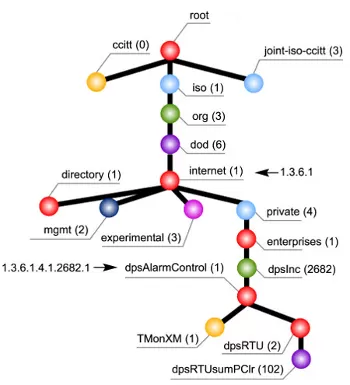
MIB stands for Management Information Base. A MIB file is a sort of "codebook" that is required to interpret traps sent from your SNMP devices.
Your SNMP manager needs these files to properly handle incoming traps. For your system to function properly, it is important to have the correct file for your system. You can get this from the manufacturer of your SNMP devices.
The manufacturer of your device will supply you with a MIB file (usually a download from their website) that you'll load ("compile") into your SNMP manager (If you've ever installed a device driver on a PC, you understand this concept). Without it for message translation, communication simply won't happen.
Read more about SNMP MIBs.
With the right know-how, you'll proactively avoid issues before they begin.
Without the appropriate MIB, your SNMP manager will not be able to handle incoming traps from an SNMP device. Remember that these files are generally available from your device manufacturer. Go to their website or call their technical support. Any new MIBs should go into your SNMP manager.
Some device manufacturers will not provide MIBs for their devices. This is usually an attempt to force you to purchase more equipment. One good way to work around this issue is to use a device that accepts manual input of trap values, such as the T/Mon.
Be on the lookout for new software, firmware releases. These upgrades may require a MIB update for your master. Install upgrades in a timely manner to ensure that your gear functions properly at all times.
The two most common MIB types are called DOS and UNIX. DOS may not work with a UNIX SNMP manager, and vice versa. Check to be sure that you are using MIBs that are compatible with your manager.
Most main MIBs require additional reference (RFC) MIBs during compiling. If any of these RFCs are missing, the main MIB will not compile properly.
On the T/Mon LNX, an error message is added to the MIB Manager log that indicates which MIB files are missing. Error reporting on other SNMP managers will vary, but you can always get a list of required reference MIBs by reading the main MIB. Make sure that you have all RFC files referenced by your main MIB and compile it again.
Bad syntax can create errors when compiling. Computers won't understand the underlying concepts if your syntax is wrong. Exactly how much goes wrong will vary based upon the compiler that you are using. Although typos can take many forms, one of the most common is the incorrectly escaped file comment.
File comments are offset from the rest of the file by double hyphens (--) and generally continue until the end of the line. An important exception is that comments can be ended by a second pair of hyphens on the same line. Any text on the same line after this second pair of hyphens will be parsed by the compiler as if it were normal MIB code, causing an error.
Anything outside of the second double hyphen (--) on the same line is considered part of the MIB code during compiling. The compiler will not know how to handle it, and an error will be generated.
Using these kinds of MIBs is not always the best choice. If they were compiled for a target platform other than your manager, it can create a range of potential problems. The MIB files you use should be text-readable before you compile them to your manager.
With these five common issues, you can easily Troubleshoot SNMP MIBs yourself. Keep in mind who you are buying your equipment from.
Do they provide support? Do they require you to buy extra equipment to access the MIB files?
By choosing a manufacturer that provides these files and offers tech support, you will save time and money. Your mission critical gear relies on the communication of your SNMP equipment. Make sure that you know all the necessary information to keep your network up and to protect your gear.
You have expensive and mission-critical gear located at your sites. Your network and your entire operation hinges on the successful operation of these critical pieces of equipment. You simply can't afford to monitor this gear with free tools you download somewhere on the internet that's likely running on unstable, consumer-grade hardware.
You need an efficient solution for the monitoring and management of your network.
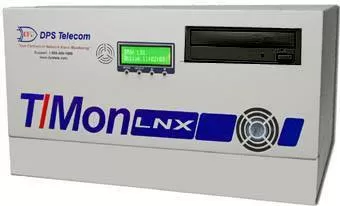
The T/Mon LNX Remote Alarm Monitoring System is a multiprotocol, multifunction network alarm manager designed as a single-platform solution for all alarm monitoring applications. T/Mon collects alarm data from lots of different SNMP equipment throughout many manufacturers and protocols. The flagship LNX platform includes a Web 3.0 browser interface (video) and a mobile web interface for smartphones. Use this master station to connect all your mission-critical SNMP gear.
Call DPS Telecom today at 1-800-693-0351