
Download our free Monitoring Fundamentals Tutorial.
An introduction to Monitoring Fundamentals strictly from the perspective of telecom network alarm management.
1-800-693-0351
Have a specific question? Ask our team of expert engineers and get a specific answer!
Sign up for the next DPS Factory Training!

Whether you're new to our equipment or you've used it for years, DPS factory training is the best way to get more from your monitoring.
Reserve Your Seat Today Average user rating: 4.2 out of 5 stars based on 39 reviews from the install base.
 If part of your monitoring involves a person looking at a printer log, you're running a big risk. An important alarm could be missed, resulting in an outage that could have been easily prevented.
Versatile Input, Versatile Output
The T/MonXM Auto-Databasing ASCII Module eliminates this risk and frees up valuable staff time for use in other areas. As ASCII alarm data is received from your devices, it is parsed and converted into a standardized T/Mon alarm. Next, the alarm can be mediated as an SNMP trap, used to trigger a derived alarm or control, or applied in one of many other ways.
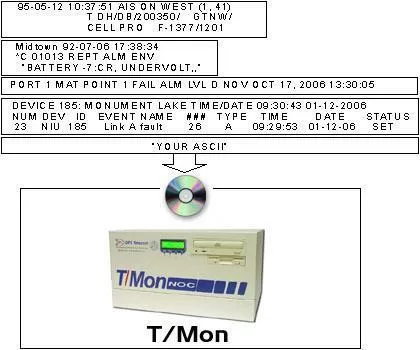
With the Auto-Databasing ASCII module installed, your monitoring system can see much, much more than it ever could before, including:
It is also important to remember that TL1 is ASCII, so any data transmitted in TL1 protocol can be parsed by the ASCII Module. One common application of this capability is to convert TL1 alarms to SNMP traps.
To provide maximum value for clients, T/Mon's ASCII processing capabilities were designed with a strong emphasis on versatility. The heart of the system is the ASCII Processing Language, which gives T/Mon users the power to define custom parsing rules for output from any network element. This makes the system highly extendable. You're never limited to a select list of supported devices. If it outputs human-readable ASCII text, you can monitor it.
You even get to pick which alarms you want to see. It's all about giving you total control over your monitoring.
T/Mon ASCII Processing Provides Real-World Results
3 Rivers Telephone, a Montana-based cooperative, learned value of the ASCII Interrogator firsthand when a backhoe operator broke through one of their fibers:

"All of a sudden we started getting alarms - ASCII alarms from the Alcatel fiber terminal, from the multiplexers saying they'd lost connectivity, from some of the switches saying they had lost carriers, and from the AFC saying it had lost some carriers on that fiber," said Network Technician Rick Jacobson.
"The alarms told us is we had a critical in a fiber terminal in one area, and nothing reporting from the next fiber terminal up," Jacobson continued. "That immediately narrowed it down to one stretch of road to drive to locate the cut. All we had to do was find the hole, and when we did the backhoe sitting there told us the story.
"If we didn't have T/Mon ASCII processing, all we'd get is a summary alarm," said Jacobson. "Then we'd have to log in to the fiber terminal to see what the alarm really was. But with ASCII, we got a very detailed alarm within seconds, showing which fiber ports had lost their connection. So there wasn't any doubt what was happening...Read Full Success Story
Client Review: West River Cooperative Telephone Company
To receive a price quote or ROI analysis...
Call 1-800-693-0351


