Check out our White Paper Series!
A complete library of helpful advice and survival guides for every aspect of system monitoring and control.
1-800-693-0351
Have a specific question? Ask our team of expert engineers and get a specific answer!
Sign up for the next DPS Factory Training!

Whether you're new to our equipment or you've used it for years, DPS factory training is the best way to get more from your monitoring.
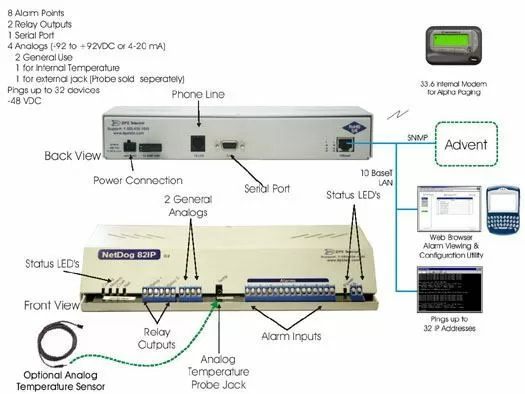
Reserve Your Seat TodayThe new NetDog 82IP (G2) has a capacity of 8 discrete inputs and 2 control relays. The NetDog 82IP's 8 discrete alarm inputs can accept any contact closure type of event, such as door switches, fuse alarms, major and minor equipment alarms, high temperature alarms and tower light monitors. The NetDog 82IP G2 features four Analog Ports. Two of these ports are for general purpose monitoring and feature a voltage mode of +/- 92VDC or industry standard 4-20mA mode. In addition there is an internal and external built in temperature sensors. The temperature sensors provides rack temperature as well as ambient room temperature monitoring.
The 2 control relay outputs can be used for a number of functions. The can operate standby equipment, door locks or emergency lighting. The NetDog 82IP's built in 33.6 modem will not only dial to a pager directly to report a fault or alarm, but once alerted, the staff can dial into the NetDog 82IP using the telnet session and control up to 2 different pieces of equipment i.e. back up generator, turning lights on etc.
The NetDog is an SNMP RTU. That means that it can send SNMP traps to any SNMP manager, including your Advent manager. Traps can be sent as SNMPv1, v2c, or SNMPv3, depending on your preference. v3 offers heightened security that older versions of the protocol can't match.
The NetDog 82IP is easy to install, with connectors for all ports and captive screw-lug terminals for alarm and control wiring. The unit mounts on any vertical flat surface, or it can be desktop mounted. If needed, we also carry mounting panels for equipment rack mounting. The built in 33.6 modem is a great way to get dial up access to this equipment should your primary transport fail.
The NetDog 82IP is programmed using any generic TTY terminal. The easy-to-use menus enable you to quickly set up your NetDog with your pager number, point descriptions and additional options. Programming can also be done using your LAN or via dial-up modem. The entire configuration is saved on the NetDog where it remains secure through power outages in non-volatile RAM. The NetDog 82IP can also ping up to 32 network elements which will notify you if key network elements fail. If an element fails to respond to successive pings, or if something is amiss with the environmental controls, the NetDog 82IP notifies personnel using a variety of methods with a complete status message, including sending an SNMP trap over IP to your Advent SNMP Manager and/or a text message to your pager.
Depending on the outputs that your non-SNMP equipment has, we can tackle this in a few different ways. The simplest is if your equipment can output contact closures to indicate alarm conditions. An RTU like the NetDog (or many "NetGuardian" models from the same manufacturer) can accept contact closure alarms.
Once these alarms are captured by an SNMP RTU, the data can be sent to your SNMP manager as traps. Is there a problem with this approach? Yes. Sometimes there is.
You'll find that many contact closure outputs are only "summary alarms". They tell you whether you have a "minor", "major", or "critical" alarm, but they don't tell you WHICH alarm. "Critical" could mean "fire" or "theft in progress", but you won't know until you drive out to the site. Obviously, this is way better than nothing, but how do you get better alarm detail?
Many devices have some kind of protocol output (ex. Modbus, DNP, TBOS), even if that protocol isn't SNMP. Because we're not talking about physical outputs here, there's no strict limit on the number of alarms that can be easily reported. You'll get lots of detail this way. Your only challenge will be to convert one protocol into another.
You can do this in two places. Some RTUs are smart enough to take in one protocol and convert it to SNMP traps.
If you don't want the challenge of rolling out new RTUs and a lot of sites, you can also deploy a central translating "master station". This will sit just below your SNMP manager in your logical network diagram. It will take in all of the non-SNMP alarms that it can, convert them to SNMP traps, and send them to your SNMP manager. After initial setup, you won't have to look at this mediation device again. Your SNMP manager console will have all of your alarm data in one comprehensive view.
You can contact DPS Telecom any time you have a problem at 1-800-693-0351, even if you don't have DPS equipment. We only have experts answering the phones (our average "sales rep" has 20 years of experience as an engineer), because alarm monitoring can get complicated. We'll listen to what you're trying to accomplish, then recommend some potential solutions. If you bring us something REALLY unique, you get to use us as an engineering department to design you a customized piece of equipment. Whether hardware or software needs to be changed, we can and will alter our designs to fit your specs.