
Download our free SNMP White Paper. Featuring SNMP Expert Marshall DenHartog.
This guidebook has been created to give you the information you need to successfully implement SNMP-based alarm monitoring in your network.
1-800-693-0351
Have a specific question? Ask our team of expert engineers and get a specific answer!
Sign up for the next DPS Factory Training!

Whether you're new to our equipment or you've used it for years, DPS factory training is the best way to get more from your monitoring.
Reserve Your Seat Today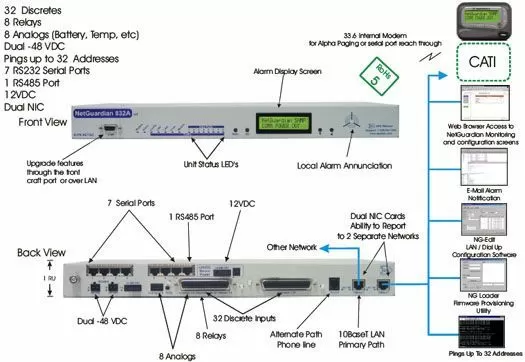
We have prepared this solution for two NetGuardian G4s, along with their own set of sensors: temperature/humidity sensor package, power out sensor and a smoke detector. The NetGuardian G4 will meet and exceed your alarm capacity requirements and have enough room for future growth.
However, you can take immediate advantage of the NetGuardian's great features such as the Web Browser Interface, Email Notification, 12V Sensor Power Supply and paging. In addition, the NetGuardian has the ability to report SNMP over IP to your CATI Manager.
The NetGuardian G4 alarm remote supports 32 discrete alarms, 8 analog inputs, 8 control relays, 7 RS232 serial ports, 1 RS485 port and an informative local LCD display all in a 1 rack unit of space. The major improvement in this design is the dual NIC support. This will allow you to report to two simultaneous networks. We've included front and back panel views of the new layout. The discrete alarms are items such as door alarms, equipment alarms and other ON/OFF events. The discrete alarms are "software reversible" to support both N/O and N/C alarm wiring. The analog alarms are used for measuring such critical events as temperature and voltage (+/- 92VDC). Each of the alarms can be assigned qualification times so that transient and nuisance alarms can be filtered out. The controls are a convenient and time efficient way of remotely switching equipment in the field via the NetGuardian's internal relays.
The RS485 port included in the NetGuardian can be used with a number of optional accessories we carry at DPS Telecom. A couple of products that can be used with the NetGuardian G4 are the General LCD Display and Building Access System. Again, we will be glad to provide pricing and further information about these products upon your request.
The NetGuardian G4 features dual -48VDC power feeds. You will be able to connect the secondary power feed to a backup source. The dual power feeds will automatically draw from the backup source if the primary source becomes unavailable.


