
Download our free Monitoring Fundamentals Tutorial.
An introduction to Monitoring Fundamentals strictly from the perspective of telecom network alarm management.
1-800-693-0351
Have a specific question? Ask our team of expert engineers and get a specific answer!
Sign up for the next DPS Factory Training!

Whether you're new to our equipment or you've used it for years, DPS factory training is the best way to get more from your monitoring.
Reserve Your Seat Today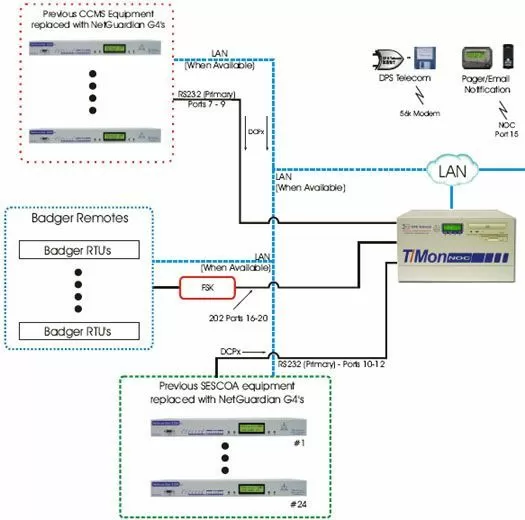
This solution includes 202 ports to accommodate your FSK transceiver. The proposal features the T/Mon NOC, loaded with the appropriate hardware configuration and software to monitor your existing Badger and SNMP equipment. Please note, we would like to receive those SNMP MIBS beforehand to ensure a smooth transition with monitoring those SNMP devices. We have also included single unit pricing of the NetGuardian G4 for swap out of CCMS and SESCOA equipment.
For FSK transceivers that have a mark of 1200 Hz and a space of 2200 Hz, we've included the standard 202 ports which will allow the T/Mon NOC to receive alarms from your existing Badger equipment via the FSK transceiver. Please note that you will require one (1) 202 port for each Badger 481 polling leg.
In order to directly poll your Badger remotess, we've included the Badger software interrogation module. We've included 12 RS232 ports with the T/Mon NOC. Six (6) of those RS232 ports will be dedicated as Badger polling legs, the other six (6) RS232 ports will be reserved for future use. We've also included a database conversion utility that will allow your existing Badger database to be substantially transferred to the T/Mon NOC saving considerable time & errors.
We have included the AutoDatabasing ASCII Software Module to monitor your CCMS equipment. Please note, in the case that you swap out the CCMS equipment, you will not require this software module. The T/Mon NOC can be preloaded with the ASCII software module that will parse the ASCII from your CCMS equipment over LAN. The Auto data basing ASCII software will allow you to create rules to parse the ASCII output and capture the key data, then present the alarm then perform paging and email notification. This software greatly enhances the overall functionality of the T/Mon NOC system and provides you with single consolidated alarm management system.


