
Download our free SNMP White Paper. Featuring SNMP Expert Marshall DenHartog.
This guidebook has been created to give you the information you need to successfully implement SNMP-based alarm monitoring in your network.
1-800-693-0351
Have a specific question? Ask our team of expert engineers and get a specific answer!
Sign up for the next DPS Factory Training!

Whether you're new to our equipment or you've used it for years, DPS factory training is the best way to get more from your monitoring.
Reserve Your Seat Today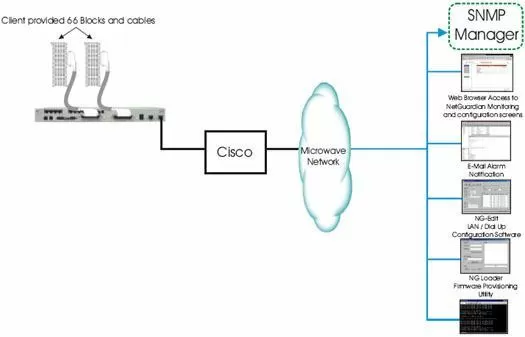
Equipment Used:
This application features our NetGuardian 832A G4, which is a showcase of advanced technology developed here at DPS Telecom. With it's ability to monitor 32 discrete alarms, support 8 controls and 8 relays, it can also serve as a stand-alone RTU. The NetGuardian has the ability to report alarms directly to you via email or text message.
One of the most powerful features found in the NetGuardian G4 is the terminal server function. This allows authorized users to access external equipment through any one of the RJ45 serial ports (110K max baud) over Telnet, Serial, or Dial-up. The controls are a convenient and time efficient way of remotely switching equipment in the field via NetGuardian's internal relays. You will be able to remotely access up to 8 external equipment such as turning ON/OFF lights, turning ON/OFF backup generators, OPEN/CLOSE gates, etc.
It also supports SNMP v2c Informs, v2C Traps and v1 Traps that support robust message delivery. When coupled with the controls features, it offers a convenient and time-efficient way of remotely switching equipment in the field. The NetGuardian G4 also comes equipped with a built-in 33.6 modem. The built-in 33.6 modem is a great way to get dial-up access to this equipment should your primary transport fail and supports full PPP functionality.
If your LAN connection is ever disrupted, the NetGuardian G4 will be able to dial into your ISP and re-establish the LAN connection. This function will prove useful time after time, especially at your unmanned remote sites. The NetGuardian offers a Web Browser interface for easy and convenient centralized alarm management and unit configuration via Web Browser that can run on any platform or operation system.
This means if you get notified of an alarm away form your normal workstation you can go to the nearest computer (with internet access) and log onto the NetGuardian. The user-friendly interface allows complete access to all the functions of the unit and enables the user to quickly set up alarm point descriptions, view alarm status, issue controls, and configure paging information, as well as additional options.


