
Download our free Monitoring Fundamentals Tutorial.
An introduction to Monitoring Fundamentals strictly from the perspective of telecom network alarm management.
1-800-693-0351
Have a specific question? Ask our team of expert engineers and get a specific answer!
Sign up for the next DPS Factory Training!

Whether you're new to our equipment or you've used it for years, DPS factory training is the best way to get more from your monitoring.
Reserve Your Seat Today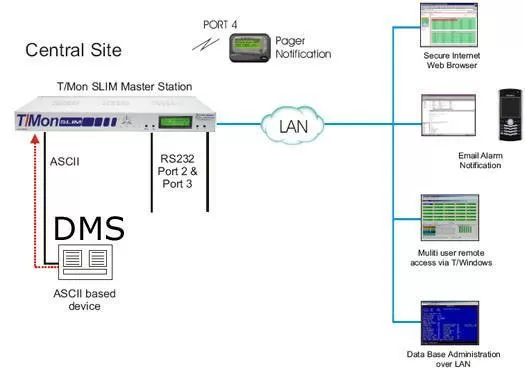
Understanding your concern on finding a solution for monitoring your DMS equipment, under your budget requirements, we have created this solution.
The following options may be added:
-T/Mon Gold Plan - Which allows for software update, expedited RMA process, etc.
-NetGuardian 832s - The alarm boxes that would typically be located at your remotes sites can be purchased as each site comes comes online.
-T/GFX - The graphical head end display that is used for visual representation of your network.
All of these items can be purchased at a later time (or budget cycle). The core solution consists of a T/Mon SLIM, located at the central site, which will receive ASCII alarm text strings via a serial connection (RS232) from the DMS. Those alarms will be passed and turned into actual T/Mon alarms for notification to your team.
The T/Mon SLIM can be preloaded with the ASCII software module that will parse the ASCII coming from your DMS and similar type devices. The Auto data basing ASCII software will allow you to create rules to parse the ASCII output and capture the key data, then present the alarm then perform paging and email notification. This software greatly enhances the overall functionality of the T/Mon SLIM system and provides you with a single consolidated alarm management system.
The T/Mon SLIM will keep your technicians apprised of any threats to the health of your network with automatic alarm notification to their pager, e-mail and SMS messaging device. Technicians from the field they can in turn remotely access and acknowledge alarms via Web browser or T/Windows remote access software. Local visibility of general alarm status can be also viewed from the front panel LCD and 8 bicolor LEDs. In addition, the SLIM allows users to maintain alarm history logs and analyze past alarms to identify network weak spots and anticipate future problems. Use Derived Alarms to track complex network problems by correlating different alarm events. You can also use derived controls to program flexible automatic corrections for network problems.


