
Download our free SNMP White Paper. Featuring SNMP Expert Marshall DenHartog.
This guidebook has been created to give you the information you need to successfully implement SNMP-based alarm monitoring in your network.
1-800-693-0351
Have a specific question? Ask our team of expert engineers and get a specific answer!
Sign up for the next DPS Factory Training!

Whether you're new to our equipment or you've used it for years, DPS factory training is the best way to get more from your monitoring.
Reserve Your Seat TodayHow This Application Works:
This is a specialized application for monitoring QuantarTM equipment over IP.
The NetGuardian Q8 will integrate seamlessly into your existing QuantarTM Radios for SNMP reporting. The unit will be very easy to install, as it will mate directly with the 50-pin Amphenol port on the radio and be secured by the bolt previously used to secure the small antenna unit on the rear of the unit. The Amphenol plug will be self-aligning because the NGD-Q8 uses the same mounting tabs as the current antenna relay module. The antenna module will mount on the topside of the NGD-Q8 using the same bolt.
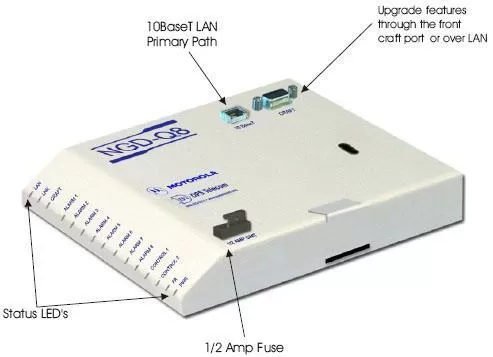
The NGD-Q8 supports up to 8 alarms that are brought in through the 50-pin amphenol ports. Also coming through that same amphenol will be the 13.8 VDC that powers the unit. The unit is protected with its own fuse. This way, you will have monitoring as long as the radio is powered.
The primary function of the NGD-Q8 is to collect alarms from the Motorola QuantarTM and convert them to SNMP. However, because the unit has individual LED's for each alarm point, you also gain the benefit of local alarm monitoring on the rear of the radio. The LED display also contains status / diagnostic information on the LAN, craft port, relays and power. The front side of the NGD-Q8 hosts two connectors. The first is an RJ45 LAN interface. The second is a DB9 craft port used for quick and easy access for diagnostic and monitoring purposes.
 TM Radios using SNMP">
There will be a TTY interface, but its scope will be limited to displaying alarm status, performing unit diagnostics, and setting the IP address. The TTY interface will be accessible from the craft port and via telnet. There will also be Web Browser interface that will allow convenient access to the alarm status by anyone (with security access rights) who wishes to browse to the unit. The advantages of this are: faster and easier to use, centralized database, LAN / craft port downloadable.
The NetGuardian Q8 is the best possible solution for integrating alarm monitoring into your radio platform. It integrates with and compliments the QUANTARTM to such a degree it will appear as though it is a "factory" option.
MOTOROLA, MOTO, MOTOROLA SOLUTIONS and the Stylized M Logo are trademarks or registered trademarks of Motorola Trademark Holdings, LLC and are used under license. All other trademarks are the property of their respective owners. © 2010 Motorola Solutions, Inc. All rights reserved.


