
Check out our White Paper Series!
A complete library of helpful advice and survival guides for every aspect of system monitoring and control.
1-800-693-0351
Have a specific question? Ask our team of expert engineers and get a specific answer!
Sign up for the next DPS Factory Training!

Whether you're new to our equipment or you've used it for years, DPS factory training is the best way to get more from your monitoring.
Reserve Your Seat Today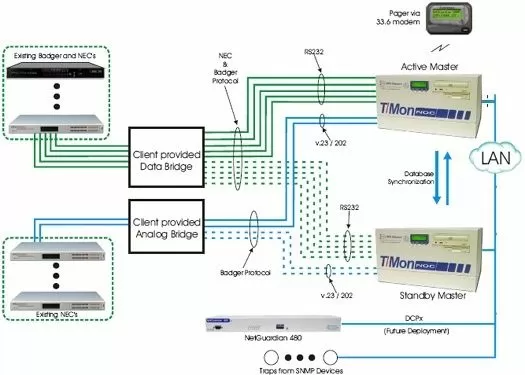
This solution features two (2) T/Mon NOC's in a dual HOT Standby Configuration. We have included the appropriate software and hardware configurations for each of the T/Mon NOC. This solution will address your vital concerns, including the gradual transition away from your existing network alarm technology to a very well supported, contemporary manager and alarm remotes. This incremental approach will enable you to immediately consolidate alarms onto a single platform, then gradually replace your existing alarm remotes at a time when resources and budgets allow.
The solution will allow you to consolidate the alarms from your Badger equipment and NEC equipment as well as SNMP traps from your SNMP equipment. This solution consists of both hardware and software elements. The hardware takes the form of the T/Mon NOC integrated with the appropriate interface cartridges in a dual HOT Standby Configuration. The two (2) T/Mon NOC's will communicate over a LAN connection with the included T/Mon NRI Synchronization Module
In order to database alarms from your NEC and BADGER remotes we have included the NEC and BADGER to T/Mon NOC Database Conversion utility. The NEC will have its separate conversion utility and the BADGER will have its own as well. This utility assists with the database conversion from the NEC or BADGER Master to T/Mon NOC. It does this by performing the "Bulk" of the transfer. This utility will transfer: Address, Points, Provisioning information (Points/Controls) and create site controls. This converter drastically reduces the time it takes to be up and running on T/Mon NOC and reduces manual data conversion errors. The user must still fine-tune the point database by entering alarm severity and windows. It is intended that this utility be run by a DPS personnel during the system turn up process. Operation requires a "captured" database dump from the NEC and BADGER master.


