
Download our free SNMP White Paper. Featuring SNMP Expert Marshall DenHartog.
This guidebook has been created to give you the information you need to successfully implement SNMP-based alarm monitoring in your network.
1-800-693-0351
Have a specific question? Ask our team of expert engineers and get a specific answer!
Sign up for the next DPS Factory Training!

Whether you're new to our equipment or you've used it for years, DPS factory training is the best way to get more from your monitoring.
Reserve Your Seat Today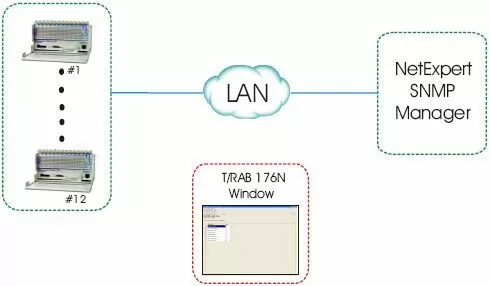
Equipment Used:
This proposal includes Remote Alarm Blocks that will send alarms over a LAN connection to your NetExpert manager using the SNMP protocol.
The Remote Alarm Block (RAB) 176N provides high-capacity alarm monitoring while retaining rack space for revenue-generating equipment, making it the ideal RTU for any site with many alarms and limited space. It can be mounted on the wall or in a placed in a rack with the supplied rack mounts. The RAB's standard wire wrap terminations for alarms inputs make the unit a natural fit for any telecommunications site where distribution frames are used.
The RAB 176N reports alarms as SNMP traps over UDP/IP, and supports alarm polling via DCP, DCPf, DCPx, or DCP1 over UDP/IP, TCP/IP OR RS232. Both the SNMP and DCP channels can operate at the same time, so the RAB can report alarms simultaneously to multiple SNMP managers and the T/Mon NOC Network Alarm Management System.
In addition to its 176 discrete alarm inputs, the RAB 176N has 4 control relays, 2 Form A and 2 Form C. Using the control relays, you can reboot remote devices, start backup equipment, and open security doors directly from the T/Mon NOC, saving expensive windshield time.
To reduce nuisance alarms, the RAB 176N features user-set alarm qualification times of 100 to 10,000 milliseconds. This will allow you to clearly distinguish momentary status changes from serious problems. The RAB 176N also supports an internal real-time clock, so date/time stamps in SNMP traps are always correct. Technicians can view the front LEDs for local alarm visibility.
Configuration is easy and trouble-free using T/RAB 176N Config, a Windows 2000/XP utility included free with your Remote Alarm Block. Using T/Config, a technician in the field can configure, provision, and turn up the unit, and also monitor alarm points, operate control relays, analyze communications traffic, and load firmware upgrades.
DPS offers FREE LIFETIME SOFTWARE upgrades, which you can easily download to your PC then transfer it to your Remote Alarm Block to make sure you have all the latest & greatest benefits that have been developed.


