
Download our free SNMP White Paper. Featuring SNMP Expert Marshall DenHartog.
This guidebook has been created to give you the information you need to successfully implement SNMP-based alarm monitoring in your network.
1-800-693-0351
Have a specific question? Ask our team of expert engineers and get a specific answer!
Sign up for the next DPS Factory Training!

Whether you're new to our equipment or you've used it for years, DPS factory training is the best way to get more from your monitoring.
Reserve Your Seat TodayTo truly ensure that your Nortel switches are operating properly, you need to monitor it. This applies to all of your network gear. Monitoring your network equipment protects your critical equipment such as your Nortel switch. It lets your technicians know immediately if there is a problem. By monitoring the transmission of data from your switches and other network devices, you can quickly dispatch technicians. You can send them to the exact site of a problem using your alarm monitoring system master.
When your switch is offline, you are losing revenues every second. You need a monitoring system to help you quickly identify problems. You must provide consistent communications services for your clients. Protect your switches and other mission-critical devices with an advanced monitoring system built around T/Mon NOC, and prevent outages before they occur.
When looking for a monitor, you also want to keep in mind your other equipment. If you have Remote Telemetry Units (RTUs), batteries, generators, sensors, entry control units or other systems that need monitoring, you want to make sure that you have a Monitor or Alarm Manager that can synchronize all of your equipment and streamline your network to make monitoring simple. Select a manager that can mediate multiple proprietary and legacy protocols as well as monitor legacy gear. When you have a compilation of different equipment, its much more cost effective to purchase a master that can monitor everything all at once, rather than try to replace all your equipment to make it compatible.
The T/Mon SLIM by DPS Telecom comes with a maximum capacity of 64 network devices. Each address/port location will take up one device in the T/Mon SLIM capacity. Be sure to evaluate projected growth in your network (equipment). The T/Mon SLIM offers advanced alarm monitoring in 1RU form factor. The T/Mon SLIM allows you to consolidate alarms from multiple remote sites into a single platform then share that alarm information with up to five users simultaneously using its built-in Web Browser interface or T/Windows remote access software. The T/Mon SLIM is a complete network alarm monitoring system in a slim package. It's the full power of the T/Mon NOC Remote Alarm Monitoring System, scaled to the needs of small, local and regional networks.
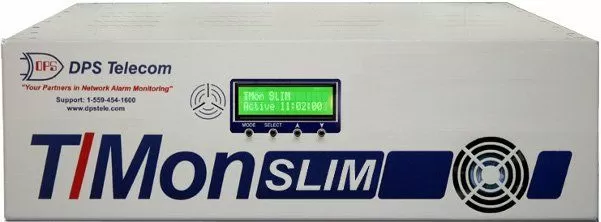
The T/Mon SLIM will keep your technicians apprised of any threats to the health of your network with automatic alarm notification to their pager, e-mail and SMS messaging device. Technicians from the field they can in turn remotely access and acknowledge alarms via Web browser or T/Windows remote access software.
Local visibility of general alarm status can be also viewed from the front panel LCD and 8 bicolor LEDs. In addition, the SLIM allows users to maintain alarm history logs and analyze past alarms to identify network weak spots and anticipate future problems. Use Derived Alarms to track complex network problems by correlating different alarm events. You can also use derived controls to program flexible automatic corrections for network problems.
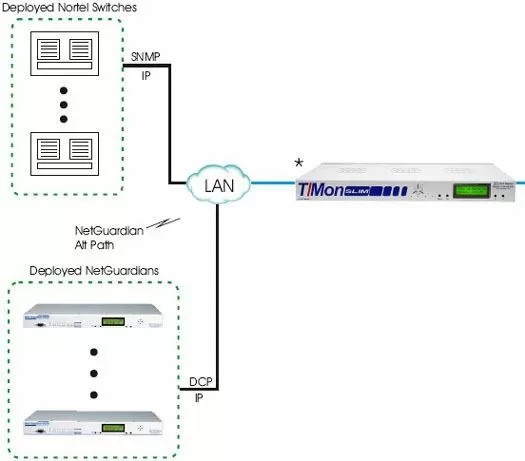
The diagram above shows just one possible layout for a system. Every system is unique but the main components that are in the diagram are typical. The system consists of several Nortel switches, some NetGuardians and a T/Mon SLIM Master Unit.
This application consists of both software and hardware elements. The T/Mon SLIM master station will provide a central aggregation point and alarm notification for you. Not only will it be able to monitor NetGuardians, but it will come equipped with our SNMP software module that will allow it to take in MIB files from your Nortel switches.
When ever there is an alarm, either on a NetGuardian or from one of the Nortel switches, a notification is sent via LAN to the T/Mon SLIM. The T/Mon then alerts you via SMS message or email that there is an alarm that needs to be addressed. Using the web browser interface, you can learn what the alarm is and its status, along with other important information.
You cannot afford to leave any of your equipment unmonitored, especially not your Nortel switches. Just because some of your gear may be legacy or use a proprietary protocol, does not mean that you can't have total site visibility. With the T/Mon SLIM, you will always know what is going on at all of your remote sites and the status of all of your equipment. Leaving your network vulnerable is a risk you simply can not afford. Call DPS Telecom today to find out more about the T/Mon SLIM Monitor and other products, such as NetGuardian Remote Telemetry Units.


