
Download our free Monitoring Fundamentals Tutorial.
An introduction to Monitoring Fundamentals strictly from the perspective of telecom network alarm management.
1-800-693-0351
Have a specific question? Ask our team of expert engineers and get a specific answer!
Sign up for the next DPS Factory Training!

Whether you're new to our equipment or you've used it for years, DPS factory training is the best way to get more from your monitoring.
Reserve Your Seat Today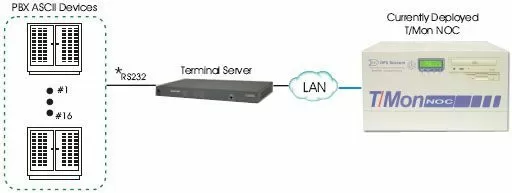
This solution will consolidate the ASCII from your PBX devices and report those alarms to your T/Mon NOC. We have included two (2) options. Both devices we've included in this solution are bi-directional, so data can be sent and received to your PBX's.
Option #1 features the 8 Serial Port Switch. The 8 channel switch will multiplex 8 RS232 devices to a single RS232 port. Since there are sixteen (16) devices we've included two (2) of the routers. These will provide you with DB9 connectors to tie into your PBX devices and an DB9 RS232 connection for exporting data to your T/Mon NOC. These two (2) routers will interface with the two (2) RS232 (RJ11) connections on your T/Mon NOC. We have also included the ASCII to MUX software module, allowing any direct ASCII ports on your system to connect to the 8 serial port switch.
Option #2 consists of a single sixteen (16) port terminal server. It will provide you with sixteen (16) RS232 serial ports to tie in to your PBX devices and a LAN connection for reporting to your T/Mon NOC. This system will eliminate the need for switching because all data will be sent through an IP network.
Lastly, this solution is only for a single T/Mon NOC deployed into your network. We understand that you may be considering a dual T/Mon NOC system for the future. If you wish to implement the dual T/Mon NOC "HOT" Standby master systems, we strongly recommend option #2, as it will ease the installation and databasing when it is deployed.
We strive to exceed your expectations through teamwork, innovation, and a commitment to client satisfaction. We look forward to working with you on this project and will be contacting you soon to schedule the next steps.


