
Download our free Monitoring Fundamentals Tutorial.
An introduction to Monitoring Fundamentals strictly from the perspective of telecom network alarm management.
1-800-693-0351
Have a specific question? Ask our team of expert engineers and get a specific answer!
Sign up for the next DPS Factory Training!

Whether you're new to our equipment or you've used it for years, DPS factory training is the best way to get more from your monitoring.
Reserve Your Seat Today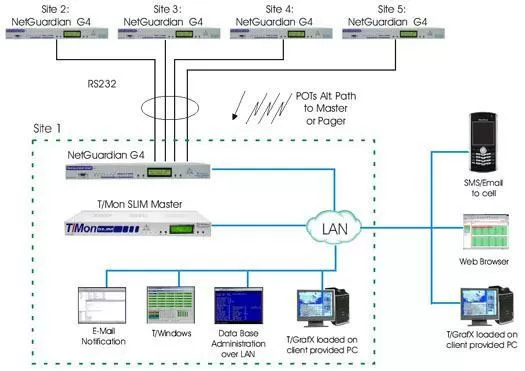
Our solution provides both Private Network / Site Monitoring and Central Monitoring & Reporting. For first few sites besides the central site (sites 2-5 in this example) will be monitored by the NetGuardian 832 G4. This RTU will report alarms to the Central Monitoring location (Site 1) via RS232, LAN or POTS. It can also be configured to provide alarm reporting directly to a technician in the event the Central monitoring location is unreachable. Site 1 will also feature the NetGuardian 832 G4 with 32 Discrete points, 8 Analogs and will have the ability to receive incoming RS232 traffic from Site 2, 3, 4 and 5. Since there will be a LAN connection at Site 1, the NetGuardian 832A G4 will be able to report to the Central Monitoring System over IP.
The T/Mon SLIM will provide you with central alarm monitoring. It includes such features as: alarm escalation, alarm notification, alarm event history, vacation-weekend mode, web browser-based access and support for our Graphical User Interface, T/GFX. Although, a local LAN will be provided by your client at Site 1, the T/Mon SLIM is equipped with the three POTS modem for alternative path alarm reporting from the NetGuardians. In addition, if Sites 2, 3, 4 and 5 gain LAN, they will be able to migrate over to their integrated Ethernet connection without the need of purchasing additional hardware or software.
The HTTPS Security Software Module allows you to access the T/Mon over the Internet via an encrypted connection. It utilizes a Secure Socket Layer (SSL) protocol thus enabling a reasonable protection from eavesdroppers and man in the middle attacks. The HTTPS software module will allow secure web access to the T/Mon Master Station over the Internet. The HTTPS encrypts the session data using a version of the SSL (Secure Socket Layer) protocol thus ensuring reasonable protection from eavesdroppers and man in the middle attacks. The level of protection depends on the correctness of the implementation by the web browser.


