
Check out our White Paper Series!
A complete library of helpful advice and survival guides for every aspect of system monitoring and control.
1-800-693-0351
Have a specific question? Ask our team of expert engineers and get a specific answer!
Sign up for the next DPS Factory Training!

Whether you're new to our equipment or you've used it for years, DPS factory training is the best way to get more from your monitoring.
Reserve Your Seat Today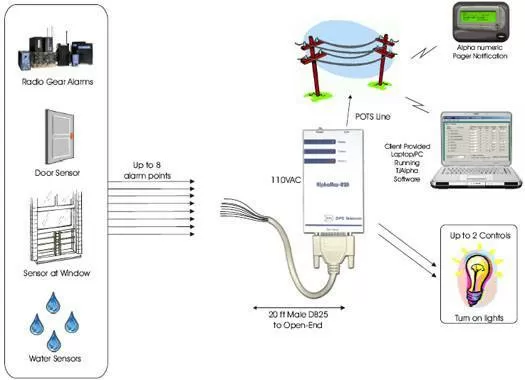
Equipment Used:
The application features a single AlphaMax 82A along with a 20 feet Male DB25 to open-end cable. The AlphaMax 82A will be able to monitor up to 8 of your environmental and radio gear alarms (discretes) at your mobile sites and report those alarms via a POTS line as a text message to your pager or cell phone.
The AlphaMax 82A is not only one of our best selling smaller capacity network elements; it's also one of our least expensive. The AlphaMax 82 has a capacity of 8 discrete inputs, and 2 control outputs. The 8 discrete inputs allow you to monitor 8 different environmental conditions. Beyond just monitoring entry violations at your building, you will be able to monitor other alarm points such as commercial power, room temperature, etc. Anytime a fault alarm is detected, the AlphaMax 82A will be able to page you with a detailed description of the alarm.
The AlphaMax's built-in modem will not only dial to your pager directly to report a fault or alarm, but once alerted, you will be able to dial into the AlphaMax and control up to 2 different pieces of equipment i.e. back up generator, turning lights on, etc. There is an optional UPS for the AlphaMax 82 that will allow continuous alarm reporting for up to 2 hours after all power has failed.
Installing the AlphaMax 82A is easy and quick. It mounts nearly anywhere - on the wall or in an equipment rack or frame. Optional screw-lug or wire-wrap connection blocks make wiring up alarms simple and trouble-free. The AlphaMax 82A is available in AC power and the only network connection it needs is a phone line.
Configuring your AlphaMax 82A unit is even simpler. Just create a configuration file with the included Windows software and upload it to your AlphaMax 82A via modem. You can configure every AlphaMax in your network without leaving your desk.


