
Download our free Monitoring Fundamentals Tutorial.
An introduction to Monitoring Fundamentals strictly from the perspective of telecom network alarm management.
1-800-693-0351
Have a specific question? Ask our team of expert engineers and get a specific answer!
Sign up for the next DPS Factory Training!

Whether you're new to our equipment or you've used it for years, DPS factory training is the best way to get more from your monitoring.
Reserve Your Seat Today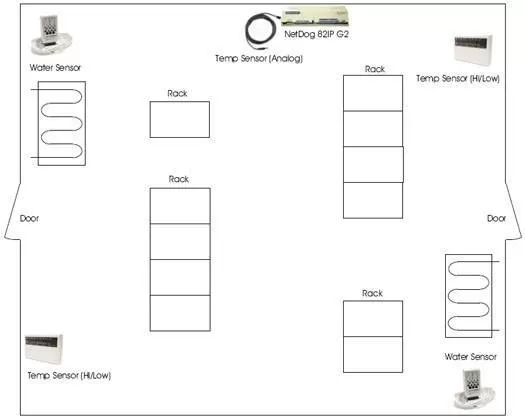
Equipment Used:
This solution features a single NetDog 82IP G2, four (4) Discrete (Hi/Low) Temperature Sensors, a single Analog Temp Sensor, a single Analog Room Temp Sensor designed specifically for the NetDog, and two Water Sensor and Controllers.
We have taken a blueprint of a typical (single) computer room layout, and have entered our units in where we would recommend their installation.
The Temperature Sensor with Probe also is an analog temperature sensor, which measures from -20 to 180 degrees Fahrenheit (-28.9 to 82.2 degrees Celsius). The unit has a native operating voltage 24 VDC to 35 VDC.
You will be able to view the Analog Temperature Sensor with Probe's real time temperature readings via the NetGuardian's web browser utility. This unit will also allow you to set four thresholds (minor under, minor, major, major over). The benefit of this is that an alarm will sound anytime any of those thresholds are reached. The unit has a native operating voltage 24 VDC to 35 VDC. Both packages includes resistor for use in -48 V operations.
The Water Sensor and Controller provide a discrete contact closure when water is detected. The sensor will not trigger an alarm due to condensation or high humidity. The unit supports N/O and N/C alarm contacts. Use it to get advance notice of potentially hazardous water leaks with a system that alerts you when leaking water is detected. The controller can support up to 6 water sensors and as many as six sensor probes can be run up to 100 feet away from either unit.
Each water sensor has two contacts, which can be hardwired to the NetGuardian. A film of water forming a bridge between either of these two contacts is all that is needed to trigger an alarm output. It is powered by 8 to 28VAC or DC (not included). For 110 VAC, use 24V wall transformer (not included).
Click Here to Learn About Data Center Cooling and Monitoring Practices


