
Check out our White Paper Series!
A complete library of helpful advice and survival guides for every aspect of system monitoring and control.
1-800-693-0351
Have a specific question? Ask our team of expert engineers and get a specific answer!
Sign up for the next DPS Factory Training!

Whether you're new to our equipment or you've used it for years, DPS factory training is the best way to get more from your monitoring.
Reserve Your Seat Today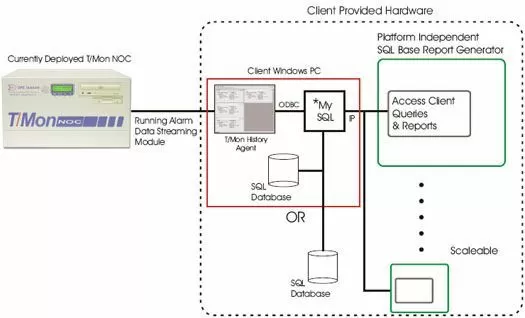
We understand the need to send your ASCII alarms to an external PC rather than a hard copy printout. To meet this need, we have prepared two options:
Option One is the T/Mon History Agent and Alarm Data Streaming Software Modules. The T/Mon History Agent will allow your T/Mon NOC to save/export historical alarm data to traditional SQL based applications. This software module is ideal for maintaining very long long-term event history as well as being a platform that allows users to create their own custom report in their native environments.
It also provides a great mechanism to interface with other applications that require current system status. This software module will run on a separate PC under Windows 2000/XP/NT and will work alongside with the Alarm Data Streaming Software Module.
The Alarm Data Streaming Software Module will enable your T/Mon NOC to output alarm activity in near real time to the T/Mon History Agent on a Windows based PC. The T/Mon History Agent will subsequently make this data available via SQL queries. The SQL database can be compiled by ODBC compliant programs, such as Microsoft Access and Excel. This will allow you to customize your alarm reports to include trending and visual charts.
Option Two is the Alarm Forwarding Software Modules. With our Alarm Forwarding Module, you can designate a port of the T/Mon NOC to forward selected alarms to your device.
The alarm format will be a text-only representation of what you see on the T/Mon COS screen, as alarms come-and-go. The format should be relatively easy to parse by an ASCII application using field lengths.


