
Check out our White Paper Series!
A complete library of helpful advice and survival guides for every aspect of system monitoring and control.
1-800-693-0351
Have a specific question? Ask our team of expert engineers and get a specific answer!
Sign up for the next DPS Factory Training!

Whether you're new to our equipment or you've used it for years, DPS factory training is the best way to get more from your monitoring.
Reserve Your Seat TodayDPS Telecom features a wide range of RTUs to fit the needs of just about any network. This example gives 3 options for RTUs to deploy that have the ability to communicate with your MegaSys Telenium manager. You may even find that the perfect deployment results in some combination of the options.
Option 1 features our smallest unit, the NetGuardian 216. The NetGuardian 216 can monitor 16 contact alarm points and can report SNMP alarms to your Telenium master. The NetGuardian 216 comes with two Analog Ports for real time monitoring of sensors (4-20mA range) or Battery Plant Monitoring (+/- 92VDC).
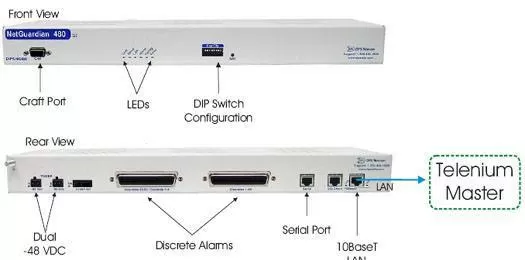
Option 2 is the high capacity NetGuardian 480. The NetGuardian 480 is a specialized member of the NetGuardian family in that it can monitor 80 alarm points. This will provide you with the best point-per-price ration available. The NetGuardian 480 will also allow you to operate 4 relays via a remote "Set" command from most SNMP managers.
Option 3 is the NetGuardian 832A G4. It provides an expandable platform for your discrete alarms. Not only will it monitor 32 discrete alarm points, support 8 controls and 8 relays, it also features 8 analog ports. The NetGuardian G4 features 7 serial reach through ports, a single RS485 port available for Building Access or a GLD Display. The 4-Port HUB will allow you to add Ethernet based equipment to your LAN without the need of purchasing an additional hub.


