
Check out our White Paper Series!
A complete library of helpful advice and survival guides for every aspect of system monitoring and control.
1-800-693-0351
Have a specific question? Ask our team of expert engineers and get a specific answer!
Sign up for the next DPS Factory Training!

Whether you're new to our equipment or you've used it for years, DPS factory training is the best way to get more from your monitoring.
Reserve Your Seat Today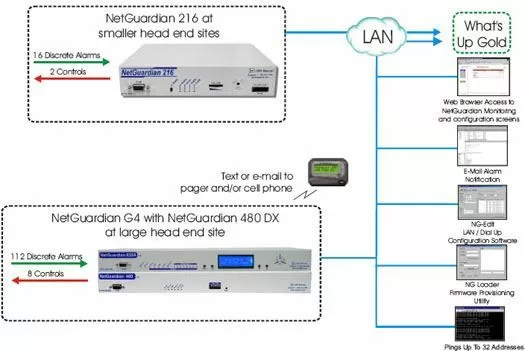
This solution features the NetGuardian G4 along with the NetGuardian 480 DX Expansion Chassis as your monitoring solution for your large head end site and the NetGuardian 216 for monitoring at your smaller head sites.
This solution will give you multiple ways of being notified when an alarm occurs, including pages and/or e-mails to your cell phone (depending on your service provider) with the NetGuardian G4 and sending those alarms via SNMP over IP to your What's Up Gold SNMP Manager.
We also have the NetGuardian 216 for your smaller head end sites. The NetGuardian 216 comes equipped with 16 discrete alarm inputs, 2 analog alarm inputs, and 2 control relay outputs. The discrete alarms are items such as door alarms, equipment alarms and other ON/OFF events. The discrete alarms are "software reversible" to support both N/O and N/C alarm wiring. The NetGuardian 216's 2 analog inputs can be used for measuring such critical events as temperature, voltage and battery. We also have a line of sensors which can be used with the NetGuardian 832A.
The NetGuardian 216 will provide complete coverage and control of your smaller remote sites with easy installation and configuration. It can report alarms via SNMP to any SNMP manager, or DCPx over either UDP or TCP to the T/Mon (DPS Master Station). The reachthrough serial port on the NG216 provides you with the ability to access a remote serial device via LAN (a.k.a. terminal server).
The NetGuardian 216 also features a real-time clock, so the NetGuardian 216 clock maintains the current date and time during a power failure. Each time an alarm occurs, a time-date stamp will be included in the SNMP/DCPx trap. Also, the NetGuardian 216 comes a with a free, easy to use, Windows based (T/NG216) utility for configuration, monitoring and diagnostic functions.


