
Download our free SNMP White Paper. Featuring SNMP Expert Marshall DenHartog.
This guidebook has been created to give you the information you need to successfully implement SNMP-based alarm monitoring in your network.
1-800-693-0351
Have a specific question? Ask our team of expert engineers and get a specific answer!
Sign up for the next DPS Factory Training!

Whether you're new to our equipment or you've used it for years, DPS factory training is the best way to get more from your monitoring.
Reserve Your Seat TodaySimple Network Management Protocol (SNMP) monitoring tools have two major capabilities and some devices support both:
Masters and RTUs work together to exchange network-monitoring data and provide detailed explanations for events when they occur. Good SNMP systems don't make you hunt through alarm points to figure out what problem you really have when you receive a message.
For a master to keep up-to-date monitoring data in a traditional polled telemetry network, it cycles through a list of Remote Telemetry Units (RTUs) sending a request for information to each. Each RTU responds when polled with some indication of status. Many polling protocols support change-of-state reporting to minimize response bandwidth. As networks grow, even the minimized no-change responses can generate essentially 'unnecessary' network traffic.
An SNMP Remote Telemetry Unit (RTU) at your site monitors environmental data and equipment status continuously. When an alarm occurs, the RTU will not wait to be polled by the master station to report a change-of-state. Instead, the RTU will send an unsolicited notification (called a TRAP) to your SNMP master station.
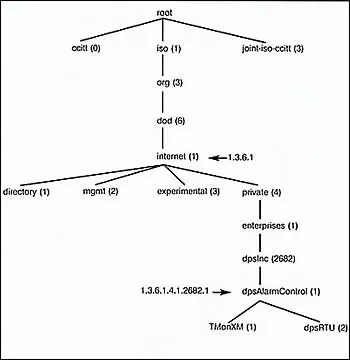
A SNMP master receives and interprets SNMP Traps from RTUs. The Master uses a Management Information Base (MIB) file to decode the object identifiers (OIDs) in the message. Most SNMP-enabled devices come with MIBs that you can load or compile into your master though some require more filtering or interpretation than others.
Reducing network traffic and the number of nuisance alarm updates makes monitoring your network easier and more responsive.
Some of your on-site monitored devices and other equipment may not support SNMP. To mediate to SNMP and provide better alarm coverage at your site, you may wish to install an SNMP capable Remote Telemetry Unit (RTU). The better SNMP RTUs will collect all of your on-site alarms and forward them as SNMP traps to your SNMP master station.
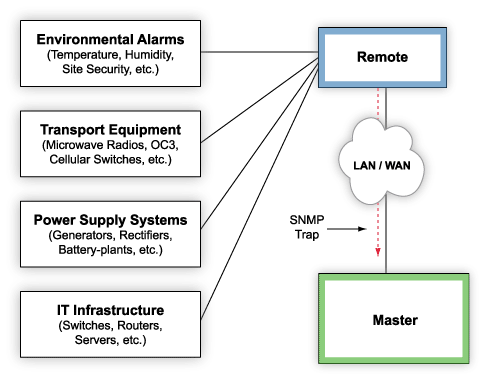
RTUs like the NetGuardian series from DPS Telecom, for example, may have as many as 64 discrete points, 8 analogs, and 8 control relays per unit, providing a massive amount of coverage at your sites. They can also forward alarms to multiple SNMP managers, so when an alarm sets, you can be sure that the right technicians know about it.
Of course, all the agent device has to do is send the trap. Your master station has to be able to decode the trap and display the alarms sent from agent devices in a meaningful way. This is what makes an SNMP manager your core SNMP monitoring tool. You can lose a few remote devices and still be in decent shape, but the loss of your manager is an instant manager.
Your standard, off-the-shelf SNMP manager won't determine the difference between an alarm set and an alarm clear trap, which can result in a number of nuisance alarms. If you're acting on alarms that have already been cleared, you're wasting time and effort when you probably have other problems to solve. An alarm master that recognizes both set and clear messages (and agent devices capable of sending the according to change-of-state messages) is essential to providing accurate network alarm data.
A strong SNMP master station should also provide detailed and precise alarm descriptions. While your SNMP remote on the scene actually sends the trap, and the best ones will include time, severity, location, and a description of the point, it can be extremely helpful if your SNMP manager can associate that trap with more information from an internally databased point.
Your SNMP master should allow you to provide accurate descriptions for alarms, trouble logs, and text messages explaining how to resolve alarms, and it should associate this information with an incoming trap associated with any given point. This way, when you receive an alarm, your technicians won't have any questions: they'll know what the problem is and they'll know how to fix it, saving precious response time.
Your better SNMP Managers can also organize incoming alarms logically, by severity, location, type, and other such data, so you can manage your network and organize your response to alarms as you see fit. Managers that don't allow you to organize alarms (either arranging by date/time received or by severity) can cause you to cross up your efforts, dispatching technicians inefficiently.
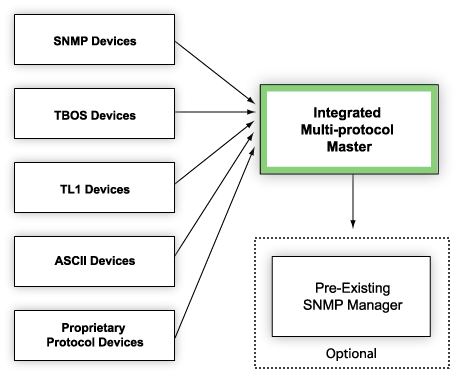
While an SNMP manager is an effective SNMP monitoring tool because it is both simple and weeds-out unnecessary traffic and data in your network management systems, it must be able to support protocols currently in use in your network. Though you may be interested in migrating to an increasingly SNMP-based management network, it is important to ensure that you don't lose visibility on any aspects of your network.
T/Mon, for example, the network management platform from DPS Telecom, is specifically designed to poll managed devices under just about any protocol, legacy, proprietary, or otherwise, and mediate them to SNMP. This ensures that you're both ready to switch to SNMP, but not liable to lose visibility on critical equipment.
As an alarm master, T/Mon can also forward SNMP traps to a higher-level SNMP manager, providing an extra layer of organization to your network, allowing you to convert entirely to SNMP at your top-level master. These capabilities make T/Mon a great top-level manager or a regional manager that can help you organize various protocols in use in your network and mediate them to SNMP.
SNMP monitoring tools can provide a powerful means to increase the efficiency of network monitoring and reduce your response time when you truly have a problem. The trick is in getting the right tools that'll provide the information you need to keep your network well managed.


