
Check out our White Paper Series!
A complete library of helpful advice and survival guides for every aspect of system monitoring and control.
1-800-693-0351
Have a specific question? Ask our team of expert engineers and get a specific answer!
Sign up for the next DPS Factory Training!

Whether you're new to our equipment or you've used it for years, DPS factory training is the best way to get more from your monitoring.
Reserve Your Seat TodayYour master station is the heart of your monitoring system. All of your Remote Telemetry Units (RTUs) report to it and you rely on it for mission-critical information. Therefore, it is important that your master station is the best that you can get. Our T/Mon LNX is an example of a modern master station that supports important hardware advances. Take a look at what these advances are and what they can do for you.
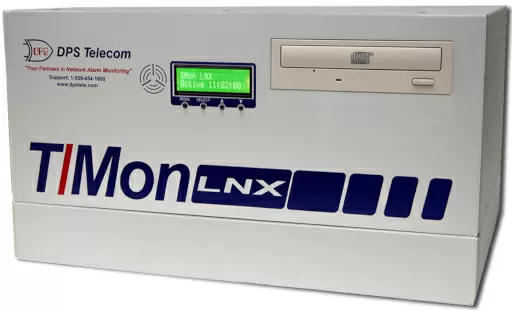
The T/MON LNX Master Station from DPS Telecom provides you with all the valuable information you need to keep your network running smoothly.
The T/Mon LNX Remote Alarm Monitoring System is a multiprotocol, multifunction network alarm manager designed as a single-platform solution for all alarm monitoring applications. T/Mon collects alarm data from a wide variety of equipment, regardless of manufacturer or protocol, and displays the state of your entire network in one interface, eliminating the need for specialized terminals.
With the T/MON LNX, you can:
What can you achieve with the new T/Mon LNX? Plenty. The first thing you'll notice about the T/Mon is its all-new hardware architecture and faster performance. But what will really impress you is what you can do with it.
The T/Mon LNX has power for your most demanding network monitoring needs - plus it's fully compatible with your existing IAM/TMonXM database.
One of the best things about the T/Mon LNX is what hasn't changed - it is fully compatible with your existing T/MonXM software and IAM/TMonXM database.
You can port your existing alarm database directly to your new T/Mon. Or DPS Telecom can port your database to your new T/Mon for you before delivery.
Database compatibility means you can immediately upgrade to the T/Mon LNX and enjoy all the advantages of greater speed and reliability - with no extra databasing required.
The heart of the T/Mon is a new Intel Pentium 2.6GHz processor that delivers 3-5 times faster performance than the IAM-5.
This means you'll have all the power you need for processor-intensive alarm monitoring applications like ASCII alarm processing, SNMP trap processing, trend analysis and Web page hosting.
Added processing power makes it easier to use advanced T/Mon features that will give you increased visibility of your network. These features will increase your network visibility and put you in control of what happens at your remote sites.
All expansion cards on the T/Mon motherboard are designed for standard PCI system bus. Expansion cards can be switched or replaced without addressing or setting interrupts. Cards are auto-detected as soon as they are installed - just plug and play.
With the T/Mon, you can easily add new ports or change your port configuration - and you don't need to open the T/Mon's case or change PCI cards.
The T/Mon supports a new port architecture called Port Interface Cartridges. Each serial port is actually an individual, modular PIC. PICs can be removed, replaced, or added - without tools.
That means it's easier than ever to monitor new devices and new sites on your network. If you need to use a new type of data transport, you can easily add the appropriate Port Interface Cartridge.
Let's say you need to monitor a site that only supports FSK modem transport, and your T/Mon is equipped with only RS-232 ports. In less than five minutes you can remove an RS-232 PIC and replace it with an FSK PIC.
Port Interface Cartridges are available for RS-232, RS-422/485, 202 modem, 212 modem, and FSK modem.
Depending on the ordering option you select, your T/Mon will ship with one, two, or three PCI serial cards, each supporting eight Port Interface Cartridges. Your T/Mon can support 8, 16, or 24 interface ports, making it easy to connect as many serial devices as you need and integrating more of your network monitoring to a common T/Mon platform.
Every serial port on the T/Mon is powered by a 11520-baud serial card equipped with 64-byte 16750 UART.
These high-speed serial connections eliminate transmission bottlenecks in alarm polling and reporting, greatly reducing polling latency. You'll get a more accurate, up-to-the-second picture of the real state of your network.
The T/Windows software interface for the T/Mon now supports serial, dial-up, and LAN connections. T/Windows supports every version of Windows from Windows 95 to Windows XP.
You can run the same access software on every workstation on your network, via any connection, to access your T/Mon.
With T/Windows, you work in a familiar GUI environment, giving you true point-and-click access to view and acknowledge alarms, control remote site equipment, and perform other network alarm monitoring tasks.
T/Windows simplifies training, helps you standardize monitoring procedures, and makes network monitoring easy and efficient.
You don't need a PC to connect to the T/Mon. You can plug a monitor and keyboard directly into the rack-mount unit.
Without a PC, without a connection, without software, you'll have direct control of your T/Mon.
The T/Mon's integrated scrolling LCD display provides immediate local visibility.
The LCD display presents system status, the number of standing alarms, and the number of COS alarms. Even the most casual glance at the unit can tell you if anything is wrong.
You may be one of the many network managers who feel they are locked into an obsolete legacy alarm monitoring system. You know you urgently need to upgrade your polling master and acquire modern alarm management capabilities, but the cost of replacing your entire monitoring network, including remote units, is simply too great.
If that's your situation, you can rest easy with T/Mon; it's the no-risk way to upgrade your network to a modern alarm monitoring system. Call DPS Telecom today to find out more information on how to make the switch.


