Check out our White Paper Series!
A complete library of helpful advice and survival guides for every aspect of system monitoring and control.
1-800-693-0351
Have a specific question? Ask our team of expert engineers and get a specific answer!
Sign up for the next DPS Factory Training!
Whether you're new to our equipment or you've used it for years, DPS factory training is the best way to get more from your monitoring.
Reserve Your Seat Today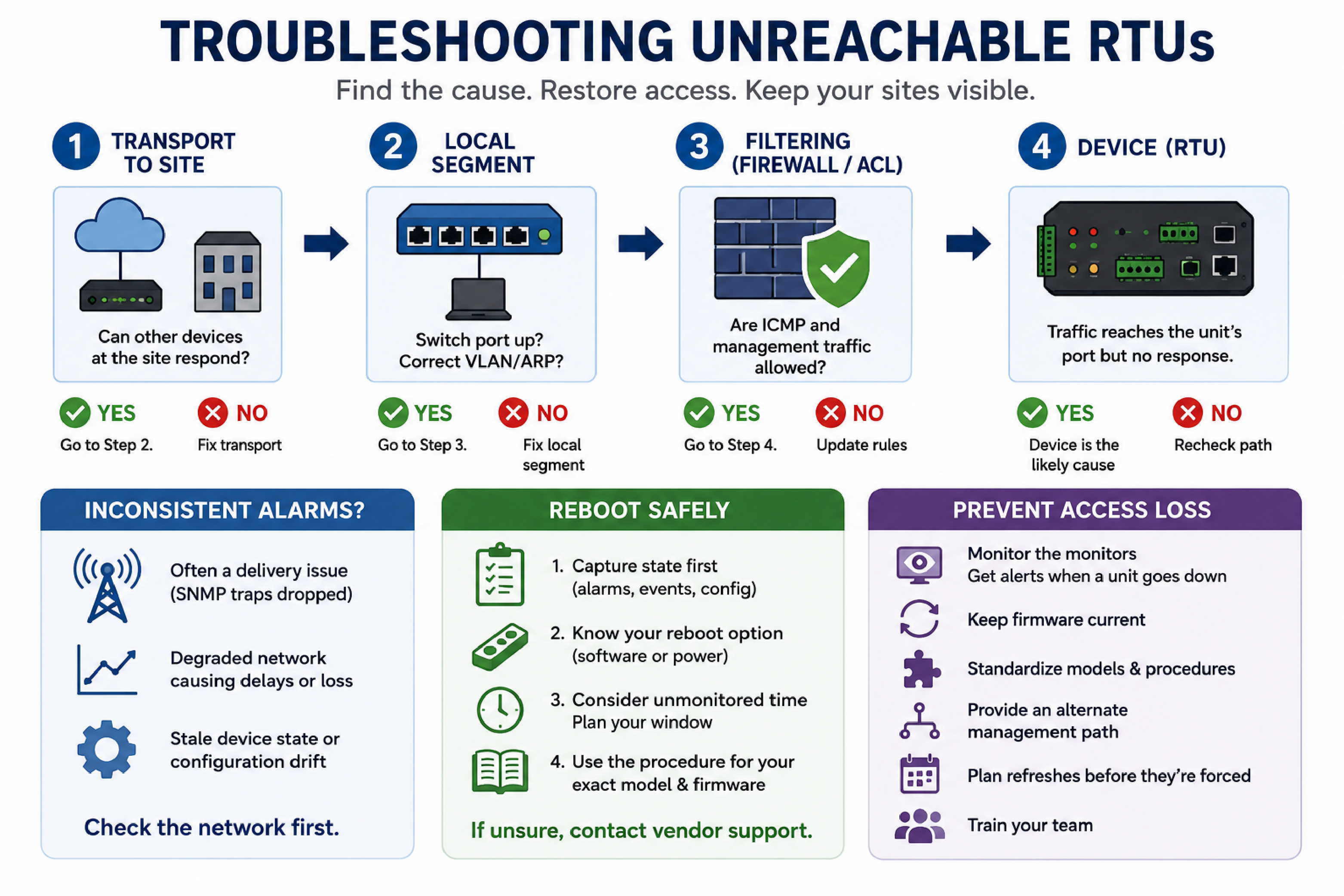
Remote access loss is the condition in which a monitoring unit at a remote site can no longer be reached over the network for management, even though the site itself may still be up. It is one of the more frustrating failures in a monitoring network, because the device built to give you visibility is the one you suddenly cannot see.
This article lays out a practical method for troubleshooting an unreachable remote telemetry unit (RTU): how to separate network causes from device causes, what inconsistent alarm behavior usually indicates, when and how to reboot safely, what information to gather before contacting vendor support, and how to reduce the odds of it happening again. It is written for NOC and network operations staff responsible for fleets of remote monitoring units.
A failed ping tells you that ICMP packets are not coming back from the device. It does not tell you why. The most useful first step is to define precisely what "connectivity is confirmed" means in your situation, because the answer determines where the problem can and cannot be.
Work through the path in order:
This ordering matters because it prevents the most common wasted effort: dispatching someone to power-cycle a unit when the actual fault was an upstream filter or a VLAN change. It also matters in the other direction - when several units in different locations become unreachable at once, a shared network cause is far more likely than simultaneous hardware failures.
Inconsistent alarming is behavior in which a unit reports some events but not others, reports them late, or shows a standing alarm state that does not match field conditions. It is a different symptom from a dead unit, and it points at a different set of causes.
Common sources, roughly in order of likelihood:
The diagnostic value of the distinction is this: intermittent delivery with a reachable unit points to the network; a unit that is both unreachable and alarming inconsistently points toward the device or its local segment. Establishing which pattern you have, before acting, keeps the fix aimed at the actual cause.
A controlled restart is a legitimate troubleshooting step for a device in a bad software state, but at a remote site it deserves more caution than a reboot at a staffed location, because if the unit does not come back, someone is driving.
Safe practice before restarting:
That last point deserves emphasis. Guessing at management-interface steps on a live monitoring unit is how a troubleshooting session becomes an outage. When the documented procedure and the interface in front of you disagree, the fastest safe path is a call to the manufacturer's support line.
An escalation package is the set of facts that lets a vendor's technical support team diagnose remotely instead of rediscovering the basics. Assembling it before the call shortens the ticket dramatically.
| Item | Why Support Needs It |
|---|---|
| Model and firmware version of each affected unit | Procedures and known issues are version-specific. |
| Exact symptoms per unit | "Unreachable" versus "reachable but alarming inconsistently" lead to different diagnostics. |
| Scope and timing | One unit or several? Same site or scattered? Sudden or gradual? Shared scope suggests a shared cause. |
| Network path evidence | What responds and what does not, from where - the isolation work from the first section. |
| Recent changes | Network, firewall, VLAN, or configuration changes preceding the symptom. |
| Captured device state | Standing alarms and event history from before any restart. |
A vendor whose products are actively supported can work from this package quickly. This is also a fair evaluation point when choosing monitoring hardware: DPS Telecom backs units in the NetGuardian product family with in-house technical support staff who work these cases, which matters most on exactly the day a unit stops answering.
Prevention here is mostly about treating the monitoring layer with the same discipline as the equipment it watches. A handful of practices cover most of the risk:
Verify the local segment: the switch port, VLAN assignment, and ARP entry for the unit, then rule out firewalls or ACLs dropping ICMP or management traffic. Only after traffic verifiably reaches the unit's port and nothing returns should the device itself become the leading suspect.
Probably not. Simultaneous access loss across separate locations points strongly to a shared cause - a routing, firewall, VLAN, or management-network change - rather than coincidental hardware failures. Investigate what those units share before dispatching to any of them.
Not as a first step. The event history is diagnostic evidence; capture it before clearing anything. Inconsistent alarming is more often a delivery problem on the network than a log problem on the unit, and clearing the log destroys the record that would prove which.
A controlled restart is a legitimate step for a unit in a bad software state, but capture its current state first, know how you will recover if it does not come back, and use the documented procedure for your exact model and firmware. If the documented steps do not match the interface in front of you, stop and confirm with the vendor rather than improvising.
Management interfaces differ across product generations and firmware versions, and instructions written for one model or version may simply not exist on another. Treat a mismatch as a signal to consult the manual for your specific model or contact the manufacturer's technical support, not as an invitation to guess.
By monitoring the monitoring layer. A polled central master raises a device-failure alarm when a unit stops answering, so access loss surfaces immediately instead of being discovered during the next incident at that site.
If your team is spending time chasing unreachable units or inconsistent alarms, the fix is usually a combination of method and platform: a disciplined isolation procedure, current firmware on actively supported hardware, and a monitoring architecture that tells you the moment a unit goes quiet. DPS Telecom can review your fleet, recommend a standardized configuration with a documented recovery procedure, and back it with in-house technical support and training. Get a Free Consultation, or call 1-800-693-0351 or email sales@dpstele.com to talk through your monitoring network.

Andrew Erickson
Andrew Erickson is an Application Engineer at DPS Telecom, a manufacturer of semi-custom remote alarm monitoring systems based in Fresno, California. Andrew brings more than 19 years of experience building site monitoring solutions, developing intuitive user interfaces and documentation, and opt...